

ACCOUNT
Account Access
See where phone verification appears, which details must match and how to return when access stalls.
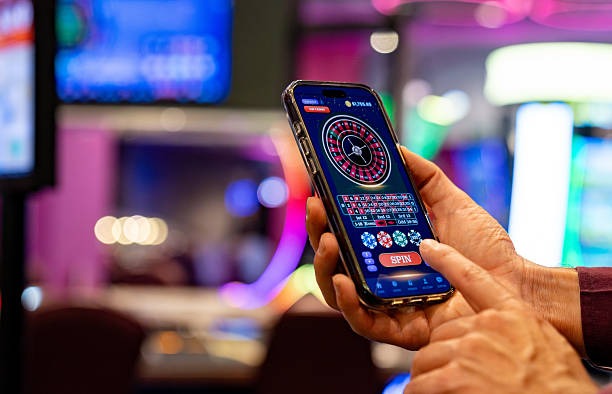
bigwiner puts Lightning Roulette Room, Aviator Crash Game, slots and football markets behind one account, with DANA and QRIS status…

and Indonesia payment rails are described as service context, where local law permits.

Cards, tables, FAQ and policy pages stay readable on small screens so you can find information on any device.
Our home brings slots, streamed dealer tables, fishing rooms and sports markets into one clear lobby with direct account and cashier paths.
Pragmatic Play, PG Soft and Habanero appear beside other recognisable studios, helping you identify the content source before opening a game from home.
Your cashier choices begin with DANA, OVO, GoPay and QRIS, all reached from the wallet link on our home page.
Our home page is also the starting point for account checks, cashier status, game details, access terms and customer help.

Four checks on our home page help you avoid account confusion. Confirm that access depends on local law, use your current phone number, read the displayed wallet status…
When account access or wallet status stalls, start from the help link on our home page rather than submitting the same action again. Live chat suits short status checks, email gives you room to attach a receipt, and mobile help keeps the account context visible. Current service availability is displayed within each contact route, so you can choose the channel that is open when you need it.
Open chat from the home or cashier area for login, verification and wallet status questions. Have your account reference ready, but never send a password or private verification code.
Use email when a DANA, OVO, GoPay, QRIS or bank receipt needs an attachment. Include the transaction reference and displayed status so our team can trace the correct record.
The phone layout keeps help near account and cashier controls. You can check the current status, capture the relevant receipt and contact us without navigating through a running game.
The mobile home runs in your phone browser, so there is no separate application claim or unfamiliar installation path.
Account protection starts before you reach the lobby. We use phone verification to confirm the access path, keep cashier activity tied to one account and show…
A verification step confirms the mobile number connected to your account before access is completed. Never share the code through an unrelated message, social profile or page outside bigwiner.club.
Use account details that correspond with your selected wallet or bank route. Matching names give our cashier team a clearer record when checking a receipt, withdrawal request or changed status.
The mobile home keeps account access, lobby search, cashier status and help within one route. This reduces the need to jump between unrelated pages when checking an action.
Use the available session and transaction records to compare what you requested with the status shown. Contact us through chat or email if an entry does not match your receipt.
An unrelated search page may show old game names, changed wallet steps or contact details we do not control.
Our home reflects the categories currently presented on the site. Scattered search pages may retain old labels or send you toward a title that is no longer visible.
Starting at bigwiner.club lets you confirm the domain before entering account details. A copied page or unrelated social link may not connect to our account system.
The home cashier link leads to DANA, OVO, GoPay, QRIS and available bank routes. Third-party pages cannot show the live status attached to your account.
Our chat, email and mobile help paths connect your question with the relevant account context. Unrelated discussion pages cannot inspect a receipt or verify an access record.
Regional access, privacy wording and account terms stay linked from the home footer. Screenshots or copied excerpts elsewhere may omit conditions that affect your current request.
Casino, slots, live tables and sports share the same home navigation on phone, tablet and computer. External discovery pages often separate these areas without showing the account connection.
Our home page leads to category pages where supplied game data can be checked before launch. Return-to-player figures, when displayed, describe long-run mathematical behaviour and do not predict a single session.
Open the selected slot page to read any displayed return figure, feature rules and stake controls.
Lightning Roulette Room uses table-specific rules and streamed results.
Live Sic Bo Turbo displays its available selections within the table interface.
Aviator Crash Game follows its own round mechanics rather than a slot paytable.
Football, badminton and basketball use market prices and settlement rules rather than return-to-player figures.
RTP percentages are informational reference values from provider documentation. Actual session outcomes vary.
Our home serves eligible customers in Indonesia through a browser-based path that works on phones, tablets and computers. From Denpasar, you can reach the same account, lobby and cashier structure shown elsewhere in supported regions. Availability depends on local law, and access may differ according to your location or personal eligibility. Check the regional terms in the home footer before creating an account or attempting to use a wallet rail.
The useful parts of our home are visible before you enter a game: a category-led lobby, local wallet access, one account route, mobile search, contact paths and policy…
These answers cover the questions you are most likely to ask before using the bigwiner home page: what the lobby contains, how account access works, where local wallet choices appear and how to request help. They also explain mobile behaviour and regional availability, giving you a practical starting point before you enter a game or submit a cashier request.
Begin with the category row if you want games, the account control if you need verification, or the cashier link if you are checking DANA or QRIS.
Choose slots, live casino, fishing rooms or sports from the home category row. Search by title when you want Lightning Roulette Room, Aviator Crash Game or another named entry.
Open the account control to create your profile, complete phone verification or check access. Use current personal details that match the wallet or bank route you intend to use.
Select DANA, OVO, GoPay, QRIS, virtual account or bank transfer where displayed. Follow the on-screen instruction, then check the existing status before trying the same request again.
Choose chat for a short status question, email for attachments or mobile help while checking your account. Current channel availability appears within the relevant contact path.